
|
|
Articles
Minimize to Tray: Minimize to the System Tray Any Program You Want!
- Introduction
- Minimize to Tray for Any Internet Browser
- Minimize to Tray for Any E-mail Client
- Minimize to Tray for Calculators
- Minimize to Tray for Any Text Editor
- Minimize to Tray for Any Packer/Archiver
- Minimize to Tray for Any Other Program
- Conclusion
- Useful Links
1. Introduction
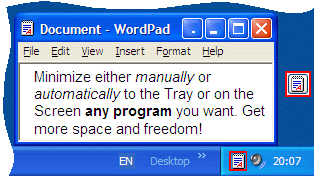
Since Windows® operating system does not provide the default ability to minimize any window to the system tray, Actual Window Minimizer was developed for this single purpose but, being developed for years, now it performs this single function flawlessly.
Actual Window Minimizer is a small but powerful utility which is only needed to be installed
to bring the Minimize to tray ability online in the quickest and easiest way: it adds an extra
 Minimize to Tray button to any window's title bar so that you can send any window to the system tray in a single mouse
click!
Minimize to Tray button to any window's title bar so that you can send any window to the system tray in a single mouse
click!
Below are given several examples of using the Minimize to Tray feature with various programs.
2. Minimize to Tray for Any Internet Browser
If you often open several windows simultaneously and keep an eye on the refreshment of information in them, you can minimize them to tray to avoid closing by mistake. And when this information is required again, you can restore these windows and see what has been changed.
It is especially useful for Internet browsers, such as Mozilla Firefox, Internet Explorer, Opera or Maxthon. If you are interested in the latest news or wait for an answer in a forum or eager to know the refreshment of quotations of rate, Actual Window Minimizer will not let you miss anything.
Back to Top
3. Minimize to Tray for Any E-mail Client
No matter what e-mail client you use - it can be Microsoft Outlook or Outlook Express, Mozilla Thunderbird, Eudora, Incredimail or any other program - Actual Window Minimizer lets you add the extra Minimize to Tray functionality to your favorite e-mail software.
In the modern world e-mail is one of the major means of communication at work and at home. That's why an e-mail client is always running on many computers (including the program authors' ones), even if a user isn't working with his e-mail client at that particular time. Thus, the e-mail client consumes valuable taskbar space, which is needed for other programs used at the moment.
By minimizing a program to the system tray we can save the taskbar space and at the same time preserve easy access to our e-mail software.
Back to Top
4. Minimize to Tray for Calculators
If you often use the standard Windows® Calculator or any other
similar tool for various calculations, think how convenient it would be to have a supplementary
Minimize to Tray button in the calculator's title bar.
When you don't need the calculator - click this button. The calculator window disappears and its icon shows in the system tray next to the clock. When you need the calculator again, click its icon in the system tray and the calculator window appears again.
Back to Top
5. Minimize to Tray for Any Text Editor
Using the
Minimize to Tray title button you can turn any text editor into a handy organizer. This concerns
Windows® Notepad, Windows® Wordpad or any other
text editor.
Achieving this is as easy as 1-2-3:
- Run the text editor and minimize it to the system tray using the
Minimize to Tray button.
- When you need to write down some idea or make some notes, click the text editor's icon in the system tray.
- You type your notes in the appeared window and then minimize it to the tray again.
You can repeat this procedure every time you need to write something down or view the notes made earlier.
Back to Top
6. Minimize to Tray for Any Packer/Archiver
If you use WinZip, WinRAR, 7-Zip or any other archiver rather often - you may find the Minimize to tray feature quite useful.
When you finish your work with the archiver for a while, click the
Minimize to Tray title button and archiver's window will be minimized to the system tray.
When you need the archiver again - click the tray icon, and the program window will be restored.
Back to Top
7. Minimize to Tray for Any Other Program
Now you can add
Minimize to Tray button to every window's title bar so that you can send any window to the system tray in a single mouse click,
thus saving precious taskbar space! It is essential for those who work on monitors with low resolution. Having 5 or 6
running applications can clutter up the task bar, and make it quite unpleasant to work with.
The nimble Minimize to Tray feature is indispensable when you have applications you don't plan to work with, but still need to keep running. Getting them into the tray is an efficient approach to optimize the desktop. No matter whether it is a MicrosoftR Office application (Word, Excel, etc.), any media player, an offline browser, a system dialog, a SSH client or any other window - Actual Window Minimizer won't let you down.
Back to Top
8. Conclusion
Actual Window Minimizer is the easiest and the most comprehensive way for the Minimize to Tray action. This is an ideal solution for programs running in the background that you don't want to close. Try it out! It is simple to learn and use, and we think you will want to keep it once you see what it does for you!
Besides the extra button, Actual Window Minimizer offers many other ways to perform the Minimize to tray action. For example, you can override the default behavior of any window's standard Minimize or Close buttons and use it for minimization to the tray. Also, you can hide windows to the tray automatically upon their startup or deactivation. You are also welcome to use the Minimize to tray system menu item or assign a custom hotkey combination (Win+. by default).
Comprising the experience of thousands of its users, Actual Window Minimizer is the ultimate solution for the Minimize to Tray problem!
9. Useful Links
See the following links that will be your guides in getting acquainted with Minimize to Tray feature:
- Download the the fully-functional 60-days trial version of Actual Window Minimizer right now. It is completely free!
- Actual Window Minimizer Home - the official page where you can download or order the risk-free version and read what users say about Actual Window Minimizer.
- Minimize Alternatively User Manual section - now you are able to minimize your windows not only to the taskbar but to alternate locations as well, such as the system tray and specific locations on the screen.
- Here you can find the information on how to create specific settings and apply Minimize to Tray action just for a particular window.
- 8 ways to minimize your program to tray - 8 different minimization options, presented by Actual Window Minimizer, originated to make window minimization more manifold and convenient.
If you have any interesting ideas about using the Minimize to Tray feature, feel free to email us about them to actualtools@actualtools.com.





Virtual Desktops: Theory and Practice of Arranging Windows within the Multiple Logical Desktops
The well-known time-proved approach to window organization is finally available in Actual Tools.
Windows 8: Better Alternative to a Native Multi-Monitor Taskbar
Comparison of Windows 8 native multi-monitor taskbar with the alternative provided by Actual Multiple Monitors.

How to Adjust Each Display of Dual Monitor for Specific Tasks
In this article you'll learn one of the most popular configuration for dual monitors.

Mozilla Thunderbird and Actual Window Manager will cope with any task
Sometimes we need to solve not ordinary tasks when working on computers. So, what shall we do? The most obvious answer is to find a program which will make your Mozilla Thunderbird suitable for any task.
How to Play StarCraft 2 on Dual Monitors: Tips and Tricks
Get a better control on StarCraft 2 in a multiple displays environment with Actual Multiple Monitors.
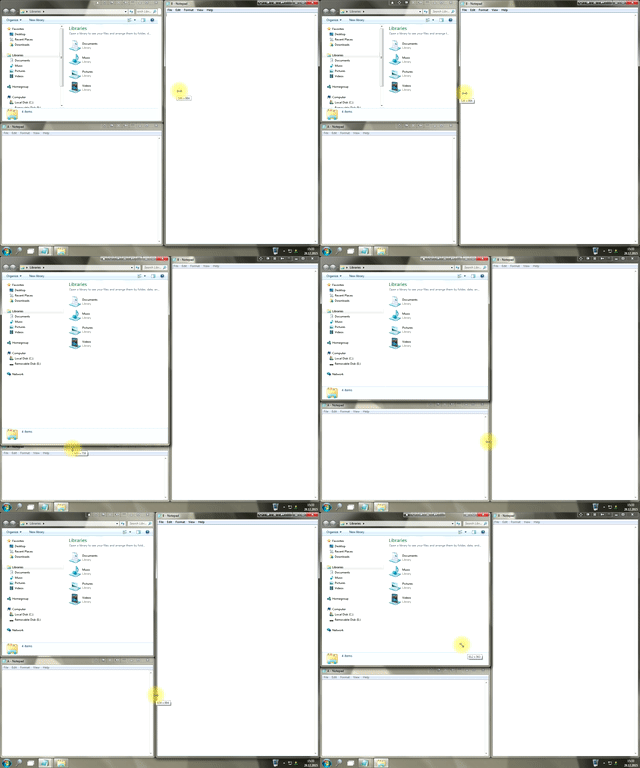
Window Group Sizing and Dragging — Organize Your Workspace Easily
In the desire to own large screens with a high resolution, we buy 4K monitors, connect televisions and projectors to computers, and assemble multi-monitor systems, but we face the problem of effective use of the new display space.
Using Actual Multiple Monitors you can solve this problem in a jiffy.
How to Quickly Switch Default Audio Device in Windows
Learn how to switch default audio device in one click by using Actual Window Manager or Actual Multiple Monitors.

Auto-text functionality in Actual Window Manager
Performing routine actions is much easier now. Actual Window Manager provides the Clipboard Templates feature.
-
Find the best way to minimize Outlook Express to the icon in tray
Just one click on Minimize To Tray title button and Outlook Express is minimized to the system tray. Just another click on tray icon and Outlook Express is restored and is ready to use again!
Multiple Monitors: Wrap the Mouse around the Desktop
Remove the desktop boundaries with Actual Multiple Monitors.
