
|
|
 | ||||||||||
Actual Multiple Monitors 8.15.3 | ||||||||||
Simply the Best Multi-Monitor Software for Windows! | ||||||||||
| ||||||||||
|



| Actual Multiple Monitors | ||||||||||||||||||||||||||
|---|---|---|---|---|---|---|---|---|---|---|---|---|---|---|---|---|---|---|---|---|---|---|---|---|---|---|
| ||||||||||||||||||||||||||


| All functions of this product are available in all-in-one Actual Window Manager |
|
| Compare Information |
Actual Multiple Monitors improves Windows® user interface when working with several monitors at once. Install Actual Multiple Monitors to get such essential controls as Taskbar,
Start menu, system tray and Task Switcher on each connected display, quickly allocate windows between monitors (either manually or automatically), improve the look-and-feel of
your desktop with the multi-monitor desktop wallpaper and screen saver, switch your laptop between internal display and external displays in a click with desktop profiles.
Play your favorite games on one monitor and chat, serf web, stream online video, etc. on the others at the same time without fear that the game will minimize.
|
Multi-Monitor Taskbar |
|
You no longer need to move the cursor to the primary screen to access the taskbar. With Actual Multiple Monitors you will get a fully functional taskbar onto each display. No matter which monitor you are working with - the following Windows 7, 8 Taskbar features will be available anywhere:
|
 |
Additional Title Bar Buttons |
|
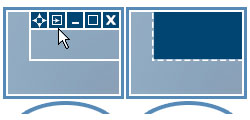 |
Be saved from routine tossing of windows between monitors - new buttons in each window's title bar give an instant access to advanced window functions and let apply them in a single click:
|
 - move a window to another monitor
 - make a window span the entire composite desktop
 Custom Hotkeys |
|
| Hotkeys is the tool of professionals, and Actual Multiple Monitors supports them in full. Most of program functions can be activated via hotkey, and you can customize the key combinations at will. Moreover, you will be able to add your own hotkeys for some window operations | 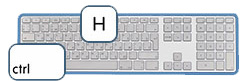 |
Multi-Monitor Gaming |
|
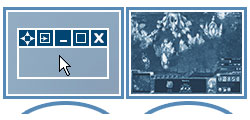 |
Gamers will appreciate several features of Actual Multiple Monitors that were developed specifically for enhancing multi-monitor gaming experience, making it more attractive and convenient:
|
Desktop Divider |
|
| Divider allows you to divide the entire large desktop or each monitor into several non-intersecting areas (tiles). If you put a window into one of such tiles, the window will expand up to tile's borders only. You can create as many custom tile layouts as you need and activate them on the fly as circumstances require. | 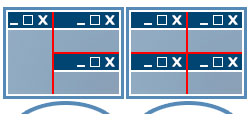 |
Window Snapping |
|
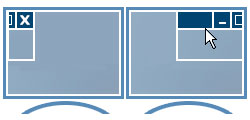 |
If you prefer arrange your windows manually, Actual Multiple Monitors will help you make it faster and more accurate by snapping a certain edge of the dragged window to:
Also, you will get an improved version of the Windows 7 Aero Snap feature: now it works on edges between monitors. |
Multi-Monitor Wallpaper |
|
Using Actual Multiple Monitors, you can set up any kind of Desktop's background on multiple displays:
|
 |
Multi-Monitor Screen Saver |
|
 |
Actual Multiple Monitors gives new abilities for screen savers (even those that don't have native multi-monitor support) - you will be able to:
|
Desktop Mirroring |
|
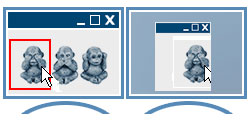
Mirroring is a special function that allows observing a certain window, monitor or a custom part of desktop in a separate window on another monitor. It can be useful in various specific situations:
|
 |
| Technical Information | ||||||||||||||||
|---|---|---|---|---|---|---|---|---|---|---|---|---|---|---|---|---|
| ||||||||||||||||
 |
 |
