Actual Tools
Actual Tools
 HOME 
 PRODUCTS 
 DOWNLOAD 
 ORDER 
 SUPPORT 
 RESOURCES 
 COMPANY 
Actual Tools
Actual Title Buttons
This software is a part of
Actual Window Manager
Compare  Information
News is in RSS format News
Actual Tools / Products / Actual Title Buttons

Actual Title Buttons logo Actual Title Buttons

Take Unlimited Control over Your Windows with New Nifty Buttons!

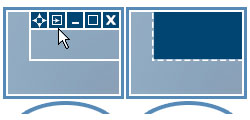
Add Minimize-to-Tray, Roll Up, Stay Always-on-Top, Make Transparent and other buttons to any window's title bar next to Minimize/Restore/Close.
Version:7.5.1 what's new
Release date:April 12, 2013
Work on:Windows 8/7/Server*/Vista/2008/XP/2003/2000
x86/x64
License type:Try-before-Buy
Free trial:60 days
Setup size:7.22 Mb
Download nowDownload now
Get Full Version Now!Order now
 

Windows concept is quite usable when it comes to minimizing, maximizing and restoring a window. However, there are still possibilities to unleash. Actual Title Buttons is the unique window management tool which offers extended window manipulation capabilities by adding new buttons to a window caption.

By clicking these buttons as you are used to do with the standard ones, you can take advantage of hidden Windows® features, such as:

These new buttons look native in all standard XP and Vista visual themes and as easy to use as general Minimize/Maximize/Close ones. You can define which buttons should be actually added as to all windows as specify an individual set of buttons for any particular window.

With the help of Actual Title Buttons you can apply the above features to almost any program:

Try Actual Title Buttons - they are surprisingly easy-to-use and very handy!

Download Now! Order Now!

What Users Say

""The two features I use most are Always-on-Top and Minimize-to-Tray. I love this product. It is my favorite piece of shareware.""
Kevin D. Higgins,
Bellevue, WA

""When using applications such as Photoshop, Premiere, Cubase Audio Production or Dreamweaver Web Design you often have a few control panels, plug-ins, plus certain other complimentary apps open, I find it indispensable to be able to Rollup + Always-on-Top them. I can arrange them in a stack on my workspace and Unroll them as I need them. If a setting is right at hand, near where you are working, it definitely helps productivity and workflow.""
Stephen Ross,
Toronto, Canada
.

"Actual Title Buttons Review at Lockergnome
"This program is a must-have for anyone who wants to avoid the distractions of other windows popping up over your active windows." "
Chris Pirillo - Lockergnome.

""thanks for a great product... it's kinda funny how I've come to depend on it, mainly to get windows out of my way, or to re-sort the order they appear on the task bar.""
Marc

""Now with the Always-on-Top button, I can make those Outlook notes stay in view without having to squash up the main window I am working with. And I can toggle the transparency to see what's under the notes if I get a couple on the screen at the same time.
It works perfectly, and is just what I was looking for! Cool idea.""
James Gerbert.
More testimonials...

Download Now! Order Now!