Actual Tools
Actual Tools
 HOME 
 PRODUCTS 
 DOWNLOAD 
 ORDER 
 SUPPORT 
 RESOURCES 
 COMPANY 
Actual Tools
Actual Title Buttons
This software is a part of
Actual Window Manager
Compare       Information
News is in RSS format News
Actual Tools / Products / Actual Title Buttons

Actual Title Buttons

Take Unlimited Control over Your Windows with New Nifty Buttons!

<img src="/images/atb_screenshot_large.gif" width="366" height="145" border="0" align="left" hspace="5" alt="Add Minimize-to-Tray, Rollup/Unroll, Stay-on-Top, Change Transparency and other buttons to any window's title bar near the standard Minimize/Maximize/Close ones."/> Version: 5.0 what's new
Release Date: January 16, 2008
Work on: Windows 95/98/ME/NT/2000/XP/2003/Vista
Free Trial: 60 days
File Size: 3.99 Mb
Download nowDownload now
Get Full Version Now!Order now

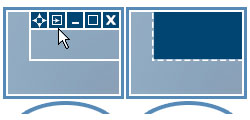
Windows concept is quite usable when it comes to minimizing, maximizing and restoring a window. However, there are still possibilities to unleash. Actual Title Buttons is the unique window management tool which offers extended window manipulation capabilities by adding new buttons to a window caption.

By clicking these buttons as you are used to do with the standard ones, you can take advantage of hidden Windows® features such as:

You can define which buttons should be actually added as for all windows as specify an individual set of buttons for any particular window.

With the help of Actual Title Buttons you can apply the above features to almost any program:

Try Actual Title Buttons - they are surprisingly easy-to-use and very handy!

Order Now! Download Now!

What Users Say

"I rigged up my webcam to point at my door, and then use your software to keep that display on top in the bottom right corner of my screen. I love it and I use it every day."

"...this is well deserved and you should be very proud... your product is exceedingly well-written, has a VERY simple appearance yet is highly functional, and is a terrific help to computer user with straightforward needs."
Brian Rea

"I put the Minimize-to-Tray, Rollup and Stay-on-Top buttons on practically every window on my system. Minimize-to-Tray is very handy for times I've got so many apps open there's not enough room in the regular Taskbar - which is most of the time."

"thanks for a great product... it's kinda funny how I've come to depend on it, mainly to get windows out of my way, or to re-sort the order they appear on the task bar."
Marc

"I love your Actual Title Buttons product. The Always-on-Top and Minimize-to-Tray buttons were EXACTLY what I was looking for!"
Joshua Brown

Read more testimonials

Order Now! Download Now!