Actual Tools
Actual Tools
 HOME 
 PRODUCTS 
 DOWNLOAD 
 ORDER 
 SUPPORT 
 RESOURCES 
 COMPANY 
Actual Tools
News is in RSS format News
Actual Tools / Support Center

How to Upgrade

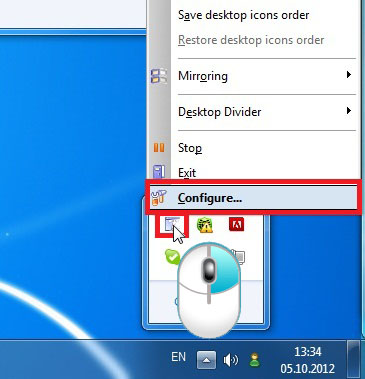
  1. Open the Configuration window.
    1. How to Upgrade - Open the Configuration window.

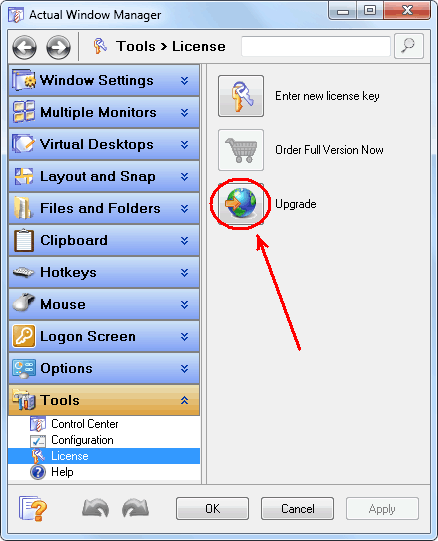
  2. Go to the Tools - License panel and click the Upgrade button, then follow the instructions of our Upgrade Center.
    2. How to Upgrade - Go to the Tools-License and click the Upgrade button.

  3. If there is no Upgrade button then please refer to the following table:

    Product When Registered Initially New Reg. Code Required Upgrade Type What to Do
    Actual Window Manager

    Actual Title Buttons

    Actual Transparent Window

    Actual Window Minimizer

    Actual Window Guard

    Actual Window Rollup

    Actual Window Menu
    before October 13, 2004 Yes Free Contact our Customer Support Service to get a new registration code
    October 13, 2004 - July 31, 2011 Yes Paid Visit our Upgrade Center and enter there your original registration code* - you will get the special link to purchase the new registration code with a significant discount
    August 1, 2011 - March 12, 2012 Yes Free Visit our Upgrade Center and enter there your original registration code* - you will receive an e-mail message with the new registration code to the e-mail address specified upon the purchase
    since March 13, 2012 No Free Simply download the new version of the product you are currently using and install it
     
    Actual Virtual Desktops before August 1, 2011 Yes Paid Visit our Upgrade Center and enter there your original registration code* - you will get the special link to purchase the new registration code with a significant discount
    August 1, 2011 - March 12, 2012 Yes Free Visit our Upgrade Center and enter there your original registration code* - you will receive an e-mail message with the new registration code to the e-mail address specified upon the purchase
    since March 13, 2012 No Free Simply download the new version and install it
     
    Actual Multiple Monitors before August 1, 2011 Yes Paid Visit our Upgrade Center and enter there your original registration code* - you will get the special link to purchase the new registration code with a significant discount
    August 1, 2011 - March 12, 2012 Yes Free Visit our Upgrade Center and enter there your original registration code* - the new code will be sent to the e-mail address you specified during the purchase
    since March 13, 2012 No Free Simply download the new version and install it
    *Note
    If you do not remember the exact date when you registered your copy of Actual Tools or lost your registration code - try to retrieve the information. If this does not help - please, contact our Customer Support Service.