
|
|
Background Panel
Available in: Actual Window Manager, Actual Multiple Monitors.
The Background panel allows you to configure Multi-monitor Background Wallpaper:
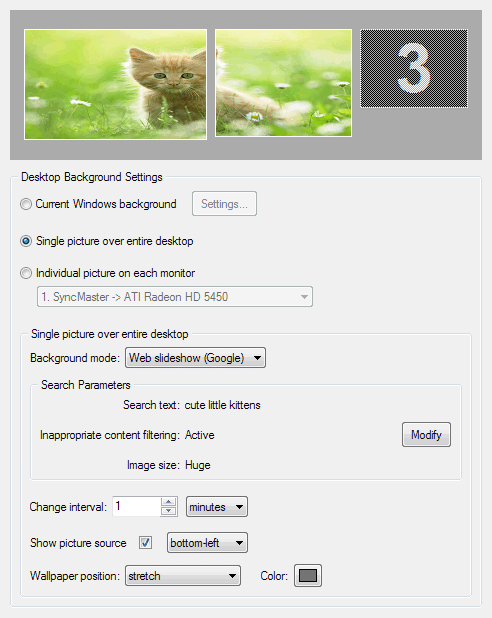
Background Preview control - displays the current layout of displays and the customized background view in according to settings specified below on this tab;
Hint
You can drag-n-drop the picture files/folders here directly from Windows Explorer to set the background for the selected mode.Current Windows background radio button - select this option if you want to leave current Windows background settings intact;
Settings... button - click this button to open the regular "Display Properties" Windows dialog with the "Desktop" tab activated;
Single picture over entire desktop radio button - select this option if you have more than one monitor and want to treat them as a single seamless desktop;
Hint
This feature can be useful if you have two or more monitors of the same physical size and the same screen resolution, arranged side by side, and want to get the consistent background view (as if you have one large display).Individual picture on each monitor radio button - select this option if you have more than one monitor and want to customize the background on each monitor independently (as if it would be a separate desktop). In the related combo box you can see the name of currently selected display device and select another display from the list;
The mode settings group allows customizing the background picture for the entire desktop/selected monitor:
Background mode combo box - allows you switching between the following available modes:
Static - select this option to use the static picture(s) to cover the desktop's/monitor's background;
Picture file edit box - here you can specify the file name of the desired background picture; also, you can click the button after this edit box to select the picture via standard "Open File" dialog or drag-n-drop the picture file onto this edit box directly from Windows Explorer;
Slideshow - select this option to automatically change the background picture with the specified time interval;
Slideshow playlist list box - use the buttons on the right of this control to add image files and folders with image files as slideshow sources or drag-n-drop the image files/folders onto this list box directly from Windows Explorer. Actual Window Manager will create a single playlist from all added sources and will rotate images from that playlist in random order on the desktop's/monitor's background;
Change interval spin edit - specify here a delay (in minutes or seconds) between slide changes;
Hint
When the slideshow is running, you can switch to next slide manually via Desktop context menu.Random play order check box - mark this option to play the specified list of slides in random order, clear it to show the slides sequentially;
Search in subfolders check box - mark this option to traverse also the subfolders of the folders added to the list while composing the actual list of pictures; otherwise, search for pictures in the added folders only;
Show picture source check box - mark this option to display a path to the folder or an URL link to the website, which the current slide picture has been loaded from. In the related combo box you can select, which picture corner this path/URL will be displayed in;
Hint
You can open the current slide picture in your default picture viewer (or default web browser) via Desktop context menu.
Web slideshow (Flickr) - same as the Slideshow mode but use the Flickr® photo sharing service as a picture source instead of the local picture files/folders. Images will be searched according to the specified search parameters; and then downloaded to be set as a background picture.
Note
Images are downloaded just to display them as a background picture; they are not stored/cached anywhere locally so as the next slide is displayed the previous one is gone.Modify button - click it to open the special window where you can specify the search parameters;
Wallpaper position combo box - here you should specify how to treat the picture when its size larger/smaller than the entire desktop's/selected monitor's resolution:
center - center the picture within the desktop/monitor (better suits for smaller pictures) tile - tile the desktop/monitor with the picture starting from its top-left corner (better suits for smaller pictures) stretch - make the picture of the same size as desktop/monitor (suits both smaller and larger pictures) proportional stretch - same as "stretch" but keep the picture's original aspect ratio crop to fit - same as "proportional stretch" but use the smaller picture's dimension (results in filling the entire area with the central part of picture and cropping the rest) shrink to fit - same as "proportional stretch" but only for pictures that outsize the desktop/monitor, the smaller pictures are shown as is Color button - click this button to customize the color for those parts of background that are not covered by the wallpaper picture.
Hint
This feature can be useful if you specified no wallpaper or select "center" or "proportional stretch" for its position.
