
|
|
[actualtools.com] New versions released
If you have problems viewing this letter in your e-mail program then you can try to open it in your web browser by copy-pasting the following link into browser's "Address" box: http://www.actualtools.com/about/newsletter_examples.php?id=73 |
| ||||||||||||||||||||||||||||||||
|
Hello, John Smith. I am glad to inform you that we have released the new version 6.7 of our main line of products, the new version 3.2 of Actual Virtual Desktops and new version 3.4 of Actual Multiple Monitors products. In this version we focus mostly on bugfixes and minor improvements of compatibility and usability. See below for details. Issue contents:
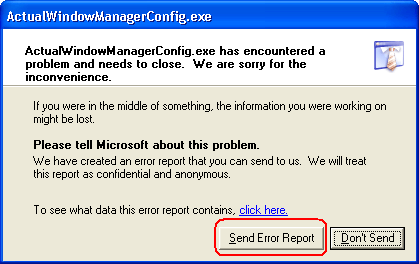
ForewordIn this version, we put a lot of efforts into improving the stability and reliability, which resulted in plenty of changes in the most basic low-level mechanisms of our programs. Although most of errors have been caught and fixed during the beta testing, some yet uncaught bugs may survive so that I call everyone who wants to help us - please send us each and every Windows Error report you will encounter. In other words, click the Send Error Report button any time you will see the regular Windows Error dialog like following:
Please send the Windows Error reports even in case they have no mentions of Actual Tools software: detailed error information will go to Microsoft where we will be able to access and analyze it thoroughly. We hope this will help us catch and fix the rest of nasty bugs and make our software clean, robust and reliable as never before. Thank you in advance for your co-operation!
New Features Comparison ChartBelow is the comparison chart of features implemented in this version. This chart shows only the most noticeable features; to view the full list of changes made in each product, click the product's icon.
Minor Fixes and Improvements
Bugfixes
How to Upgrade
Note
Back to top
If you lost your registration code - try to retrieve it here. If this does not help - please, contact our Customer Support Service.
Join Us on Facebook! Follow Us on Twitter!I'd like to remind you that you can join our Multiple Monitors Facebook group or become our follower on Twitter. There you can find the recent news about our software, useful articles and links related to a multi-monitor productivity, and share your experience with other multi-monitor users. Welcome!
That's all at the moment, thank you for your time! Waiting for any kind of feedback from you at our Beta Testing forum section or on e-mail - you are always welcome! Yours sincerely,
|





DISCLAIMER: THIS IS NOT SPAM - you received this e-mail message because you subscribed for the Actual Tools newsletter some time ago. If you do not want to receive news from Actual Tools anymore, please send an empty message to unsubscribe@actualtools.com.
|
